Getting Started in DONT LET IT HEAR
Day-one rules for 99-player flooded platforms — stay dry, listen hard, survive longer.
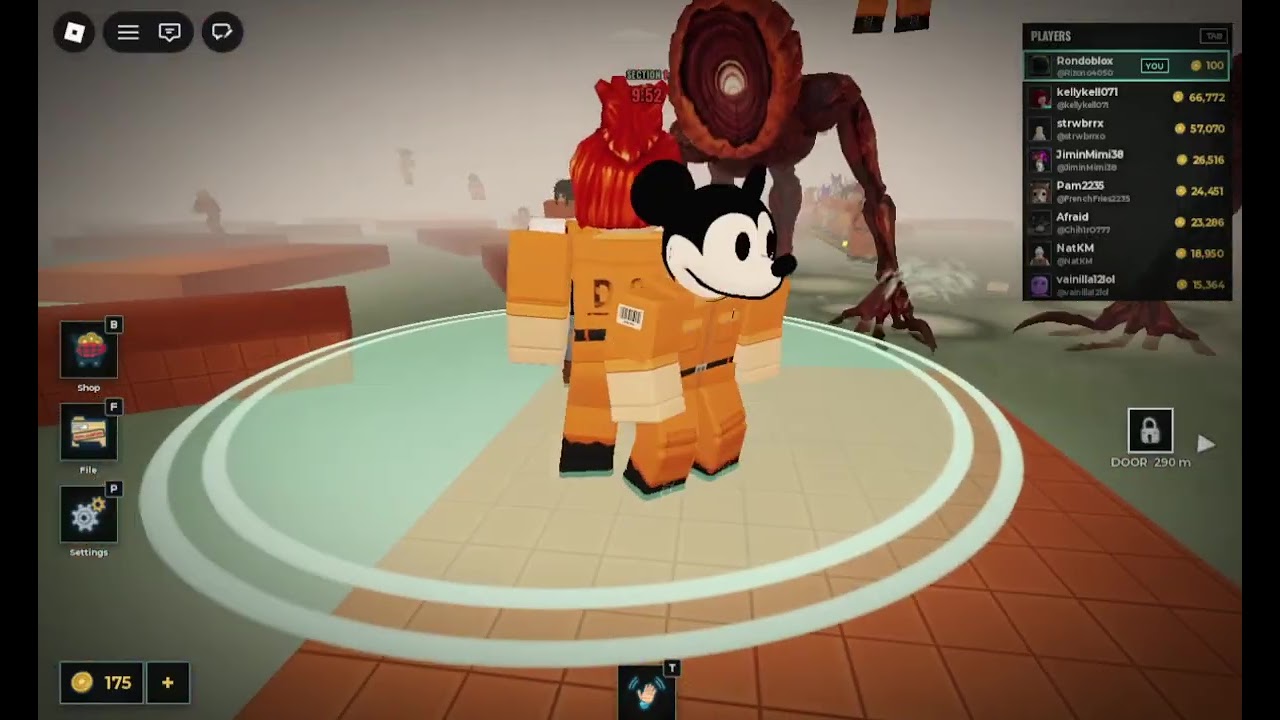
DONT LET IT HEAR is a Roblox survival escape built around flooded platforms, pool areas, and a blind creature that reacts to water. The listing often brands the experience as a 99 players lobby. Your first hour should not be about fancy routes or scripts. It should be about joining cleanly, wearing headphones, and internalizing one sentence: do not splash.
This getting-started guide is the day-one checklist. After you finish it, continue with Controls, How to Survive, Sound Mechanics, Team Tips, and the Full Walkthrough. Keep the Guides Hub bookmarked for the full map of tutorials.
Before you press Play
- Open the official place: DONT LET IT HEAR on Roblox.
- Confirm you are on a stable network. Packet loss makes jump timing and audio cues unreliable.
- Plug in headphones. Speakers in a noisy room will hide the cues that keep you alive.
- Lower distracting overlay apps. You need to hear water and threat audio more than Discord notifications.
- Optionally join creator group the shallow side from the Players Hub so you see shouts and community notes.
- Skim the Quiet Run Checklist once so your pre-run routine is automatic.
The core rule in plain language
The creature is framed as blind in the fantasy of the game, but it hears water. Splashing — from a bad jump, a sprint through a shallow edge, or a teammate cannonballing beside you — is the mistake that draws it. Dry platforms are safe ground. Wet surfaces and pool crossings are risk. When in doubt, stop moving and listen instead of improvising a heroic swim.
That rule scales brutally in a full lobby. You can play perfectly and still lose because someone else splashed two platforms away. Getting started means learning both personal discipline and how to position away from chaotic players.
First join flow
- Launch from the official page so you are not on a spoofed experience.
- Wait for the client to finish streaming map assets before you sprint. Early rubber-banding causes accidental water touches.
- Find a dry tile with clear exits. Do not AFK on a narrow ledge over water.
- Rotate the camera and identify nearby pool edges, jump gaps, and crowded chokepoints.
- Mute or ignore chat spam about fake codes — there are no confirmed working promo codes as of November 2026.
- Move only when you have a dry path. If the next tile requires a splash, wait or reroute.
Headphones and audio habits
Audio is part of the kit, not a cosmetic preference. Use headphones to:
- Hear disturbed water versus calm water
- Notice when another player has already drawn attention
- Catch threat proximity cues before you see a chase on screen
- Judge whether a crossing is worth the noise risk
If you play on mobile with a single speaker, lower game music and environmental clutter where the settings allow, and consider wired earbuds. Console players should avoid party chat drowning the experience audio — use a mix that keeps game sounds dominant.
Party and lobby tips for day one
- Small trusted stacks beat random hero plays. If you queue with friends, agree on callouts: “waiting,” “crossing,” “splash left,” “hold.”
- Do not shove teammates. Body-blocking on wet edges creates forced splashes.
- Give space after someone errs. If a player already drew the creature, do not path through their panic zone.
- Last-alive is a valid mindset. Surviving quietly helps more than performing for clips.
- Report griefers through Roblox tools when needed, then refocus on dry pathing.
Public 99-player servers are loud socially and literally. Your beginner goal is not carrying strangers. Your goal is leaving the session with better habits than you entered.
What to practice in your first three runs
Run 1 — Observation: move slowly, never touch water on purpose, and only watch how others die. Note which jumps look safe but splash on landing.
Run 2 — Timing: combine short hops with camera pre-aim using tips from Controls. Stop completely when audio feels wrong.
Run 3 — Pressure: stay in a busier lane on purpose, practice peeling away from noisy groups, and apply early ideas from How to Survive.
Between runs, stretch your hands and reset volume. Fatigue causes sloppy jumps.
Common beginner mistakes
| Mistake | Why it hurts | Fix |
|---|---|---|
| Sprinting every gap | Overshoot into water | Walk to the edge, then hop |
| Following streamers’ reckless routes | Their risk tolerance is not yours | Build a dry personal path |
| Ignoring headphones | You miss the only warning layer | Put them on before join |
| Clumping with 20 players | Shared splash radius | Take alternate dry lines |
| Opening menus on ledges | Camera drift into wet zones | Menu on wide dry platforms |
| Chasing fake codes mid-round | Distraction deaths | Check Codes Hub after |
After the tutorial mindset
Once the no-splash rule feels automatic, deepen with:
- Controls for platform-specific input
- How to Survive for advanced pathing and bait awareness
- Sound Mechanics for splash audio and calm-water waits
- Team Tips for 99-player party spacing and callouts
- Full Walkthrough for stage-pattern thinking
- Survival Habits Tier List to rank what you still do wrong
- Updates Hub so patches do not surprise you
If you were tempted by executors, read the warnings on Scripts Hub and then come back to skill pages. Bans do not teach jump timing.
Related pages
- Guides Hub — all tutorials
- Controls — movement and camera
- How to Survive — deep survival
- Sound Mechanics — hearing and splash audio
- Team Tips — party spacing and peels
- Full Walkthrough — stage patterns
- Codes Hub — reward status
- Quiet Run Checklist — pre-run routine
You do not need perfect aim. You need quiet feet, dry land, and the patience to wait while the lobby panics. That is how you get started in DONT LET IT HEAR.
Frequently Asked Questions
Quick answers about staying dry and escaping the hunt.
What is the first rule of DONT LET IT HEAR?
Do not splash. The creature hears water, so staying on dry platforms matters more than speed or flashy jumps.
Do I really need headphones?
Yes, they are strongly recommended. Audio cues for water and threat pressure are a core part of surviving crowded lobbies.
How many players can be in a server?
The experience is built around large lobbies up to 99 players, which makes teammate splash risk a constant factor.
Are there beginner codes I should redeem first?
As of November 2026 there are no confirmed working promo codes. Focus on survival habits first and watch the Codes Hub later.
What should I read after Getting Started?
Controls for input, How to Survive and Sound Mechanics for advanced tips, Team Tips for parties, then Full Walkthrough for stage-pattern routing.